
Productivity
Improve Your Workplace Productivity With Microsoft Word: 11 Tips To Make the Most of This Program
Microsoft Word is an indispensable part of most business environments. It has numerous features that


Artificial intelligence is moving fast. For many businesses, the challenge is no longer whether AI is useful. The real question is which AI tools should be used, where they should be used, and how to use them safely.
That question became much more important in March 2026, when Microsoft announced Copilot Cowork and confirmed that it had brought the technology that powers Claude Cowork into Microsoft 365 Copilot. Microsoft described this as part of a multi-model strategy, where Copilot can use the best model for the job instead of depending on only one AI provider. For business leaders, this is a major development. It means the conversation is no longer “Microsoft AI or Claude AI.” The real conversation is now about where each tool fits, how work should be governed, and how to avoid turning AI into the next wave of shadow IT.
At EasyITGuys, we believe this is the right way to think about AI. As a Microsoft partner, we strongly value the security, governance, identity, compliance, and auditability that Microsoft brings to workplace AI. At the same time, we also recognize that some AI tools outside of Microsoft can solve certain specialist tasks very well. The goal is not to pick sides. The goal is to build a safe, practical, business-ready AI strategy.
For most Microsoft-based businesses, the right first question is not “Should we buy Copilot and Claude?” but “Can Microsoft 365 Copilot now cover our needs securely, and where do specialist AI exceptions still make sense?”
In most cases, no, not for the Microsoft-integrated experience. Microsoft announced in March 2026 that it brought the technology that powers Claude Cowork into Microsoft 365 Copilot as part of its multi-model approach. That means businesses evaluating the Microsoft experience should start with Microsoft’s licensing and roadmap, not assume they must separately buy a standalone Anthropic Claude Cowork subscription just to access the new Microsoft integration.
That said, some organizations may still choose to purchase standalone Anthropic Claude Team or Enterprise separately for specialist workflows outside Microsoft 365. Anthropic publicly lists Claude Team pricing, while Microsoft separately lists pricing for Microsoft 365 Copilot and announced pricing for Agent 365 and Microsoft 365 E7.
Simple rule:
Maybe, but there are a few important details. As of Microsoft’s March 2026 announcements, Copilot Cowork was not described as broadly available to all commercial customers by default. Microsoft said it was being tested with a limited set of customers in Research Preview and would become more broadly available through the Frontier program, which is Microsoft’s early-access program for newer AI features.
If your business wants the Microsoft-integrated experience now, the practical starting point is:
Just as important, businesses should not assume they need to separately buy Anthropic Claude in order to get the Microsoft-integrated experience. Microsoft says it brought the technology that powers Claude Cowork into Microsoft 365 Copilot, and Claude is available in mainline Copilot chat through the Frontier program. That means the Microsoft path starts with Microsoft Copilot licensing and availability, not automatically a second direct purchase from Anthropic. At the same time, buyers should not assume this is the exact same thing as buying Claude Cowork directly from Anthropic. Anthropic’s Claude Cowork is its own standalone product experience, while Microsoft’s Copilot Cowork is being delivered inside Microsoft 365 with Microsoft context, governance, and controls. They are related, but they are not identical. In the official Microsoft sources reviewed, I also did not find a separate published standalone price specifically for Copilot Cowork. Microsoft does publicly list pricing for Microsoft 365 Copilot, Agent 365, and Microsoft 365 E7.
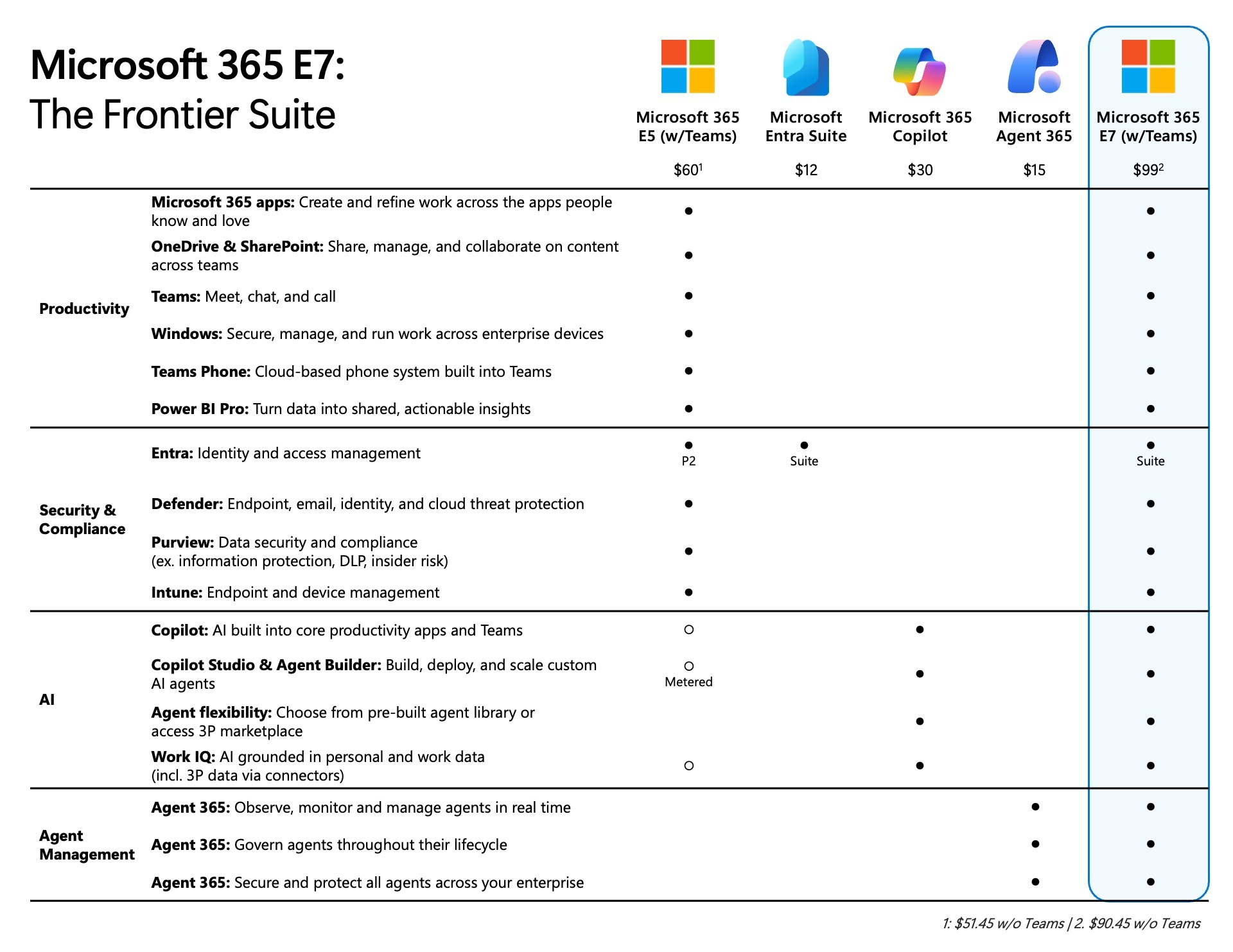
If you want this through Microsoft, start by asking:
If you want Claude Cowork directly from Anthropic, that is a separate product path and should be evaluated separately.
| Product | What it does | Best fit |
|---|---|---|
| Microsoft 365 Copilot | Helps users work inside Microsoft 365 with AI for drafting, summarizing, analyzing, and everyday productivity | Daily work in Outlook, Teams, Word, Excel, and PowerPoint |
| Copilot Cowork | Helps Copilot carry out longer, multi-step work across Microsoft 365 while keeping the user in control | Delegated work that needs planning, context, and follow-through |
| Microsoft Agent 365 | Helps IT govern, secure, and manage agents across the business | Organizations deploying agents at scale and needing centralized oversight |
| Claude Cowork | Anthropic’s own agent-style work experience for multi-step knowledge work | Specialist workflows involving deeper file handling, research, and agentic task execution |
Copilot helps people work, Copilot Cowork helps Copilot complete longer tasks, Agent 365 helps IT govern agents, and Claude Cowork is Anthropic’s standalone agent-style experience for multi-step knowledge work.
The Frontier program is Microsoft’s early-access program for newer Copilot and AI features. It gives eligible customers a way to try certain features before they are broadly released. In most organizations, employees do not enroll themselves. Access is usually managed by IT, and eligible users typically need a Microsoft 365 Copilot license plus admin enablement. Users often know they have access when Frontier-labeled features begin appearing inside Microsoft 365 Copilot, supported apps, or the Copilot interface.
Claude Cowork is Anthropic’s agent-style workspace for handing off multi-step work to Claude. Anthropic describes Cowork as bringing Claude’s agentic capabilities into the Claude desktop app for knowledge work beyond coding. In early 2026, Anthropic said Cowork ran on Claude Desktop for macOS, in an isolated VM, with direct access to local files and integrations. Anthropic later expanded Cowork features, including phone control threads and computer-use research preview capabilities. In plain English, Claude Cowork is designed to do more than answer one prompt at a time. It is meant to carry out a chain of work for you.
That can include things like:
This is why many people describe Claude Cowork as feeling more like an autonomous work agent than a simple chatbot.
Microsoft describes Copilot Cowork as the next step beyond AI chat. Instead of only helping draft or summarize, Cowork is designed to turn intent into action across Microsoft 365. Microsoft says Cowork can ground work in your emails, meetings, messages, files, and data, build a plan, continue in the background, check in when needed, and let the user approve recommended actions before changes are applied. Microsoft also says Copilot Cowork is grounded by Work IQ, which uses signals across Outlook, Teams, Excel, and the rest of Microsoft 365 so the system has work context, not just isolated prompts. That matters because most business work does not live in one file. It lives across calendars, chats, spreadsheets, presentations, documents, approvals, and shared context.
Microsoft Agent 365 is not the same thing as Microsoft 365 Copilot, and it is not the same thing as Copilot Cowork. Microsoft describes Agent 365 as the control plane for agents. In plain English, it is the management and governance layer that helps IT and security teams discover, observe, secure, and control AI agents across the organization. It is designed for businesses that want to scale agent use safely, with centralized visibility, access control, logging, and policy enforcement.
Not always. Most businesses evaluating AI for productivity should first focus on:
Agent 365 becomes more relevant when an organization moves beyond simple AI assistance and into broader agent deployment, governance, and lifecycle management at scale. Microsoft says it is available as a standalone license at $15 per user per month, and it is also included in Microsoft 365 E7.
Important note: as of Microsoft’s March 2026 announcements, Copilot Cowork was not described as generally available to all commercial customers. Microsoft positioned it as a Research Preview and Frontier program capability (source: Copilot Cowork: A new way of getting work done, Powering Frontier Transformation with Copilot and agents)
This is the most important point on the page. Microsoft stated that it worked closely with Anthropic and brought the technology that powers Claude Cowork into Microsoft 365 Copilot. Microsoft called this part of its “multimodel advantage,” meaning Copilot is designed to use the best available models for work, including Anthropic and OpenAI, rather than forcing customers into a single-model future. Microsoft also said Claude is available in mainline Copilot chat via the Frontier program, and that Copilot Cowork was initially being tested with a limited set of customers in Research Preview before broader availability in the Frontier program.
That changes the market in several ways. First, it validates the idea that specialist AI reasoning matters. Microsoft is not pretending one model does everything best. Second, it confirms that enterprise AI winners will be the platforms that combine strong models with strong governance. Third, it means businesses no longer need to think in extremes like “only Microsoft” or “only external AI.” A smarter approach is now possible: use Microsoft 365 Copilot where enterprise context, collaboration, governance, and auditability matter most, and evaluate specialist tools like Claude where they have unique strengths and can be deployed safely.
| Category | Claude Cowork | Microsoft Copilot / Copilot Cowork |
|---|---|---|
| Core idea | Agent-style work delegation for multi-step tasks | AI assistant and agentic work inside Microsoft 365 |
| Main strength | Deep task execution, local-file and cross-tool workflows | Secure work inside Microsoft 365 apps and data |
| Environment | Anthropic says Cowork began on Claude Desktop and runs in an isolated VM for local work | Microsoft says Cowork runs in a protected sandboxed cloud environment inside Microsoft 365 |
| Data context | Local files, integrations, Claude environment | Outlook, Teams, Excel, files, meetings, messages, Microsoft 365 graph and Work IQ context |
| Governance | Stronger controls available on Team and Enterprise plans | Microsoft 365 identity, permissions, compliance, and auditing apply by default |
| Best fit | Specialist, file-heavy, research-heavy, multi-step tasks | Daily business productivity, collaboration, governance-first execution |
This comparison is based on Microsoft’s product announcements and Anthropic’s release notes and plan information.
For most organizations, the answer is not “pick one forever.” The better answer is to use Microsoft Copilot first for secure, business-wide AI adoption. That is usually the right starting point when your work lives in Microsoft 365 and you need identity controls, compliance alignment, auditability, and safer rollout. Claude Cowork should be used more selectively for specialist workflows. That can make sense when a team has a legitimate use case involving more advanced agentic work, deeper reasoning, local file handling, or multi-step specialist tasks that go beyond what standard Copilot workflows handle comfortably.
Do not let staff choose tools randomly. That is how AI becomes shadow IT.
Start with AI governance, approved tools, and clear use cases. Then pilot the right solution rather than letting departments adopt random tools on their own. AI can absolutely improve productivity. But productivity without governance is not a strategy. The right question is not, “Which AI tool is best?” The better question is, “Which AI tool should our business use for this kind of work, with this kind of data, under this kind of control?” In most cases, the best choice depends less on which model sounds more impressive and more on where the work happens, what data is involved, and how much control the organization needs.
Microsoft Copilot is usually the better fit when the work is primarily inside Microsoft 365 and the organization needs control.
The value is not just AI output. The value is that the AI is operating inside a business-controlled environment. For regulated, security-conscious, or collaboration-heavy organizations, that is often the deciding factor.
Claude Cowork may be the better fit when a user or team needs more specialist, more autonomous, or more file-heavy work patterns.
Some teams genuinely need a tool that behaves more like a work agent than an in-app assistant. That does not automatically mean the whole company should use it without guardrails. It means the organization should decide who needs it, for what, under what policy, and with what data rules.
This is where many organizations are at risk. When staff use random AI tools without policy, review, or data controls, AI becomes a new form of shadow IT. Sensitive files, customer information, internal documents, pricing data, legal text, HR content, and strategic plans can all end up being pasted into tools the business has not approved. The risk is not that every AI tool is unsafe. The risk is that different tools have very different rules, controls, and data-handling models. For example, Anthropic’s privacy documentation says consumer users can choose to allow chats and coding sessions to be used to improve future Claude models. Anthropic also says Team and Enterprise plans provide stronger administrative and security features, including items such as SCIM, audit logs, and custom data retention controls. By contrast, Microsoft says Copilot Cowork runs within Microsoft 365’s existing security and governance boundaries, where identity, permissions, compliance policies, and auditing apply by default.
That is why we generally advise businesses to start with secure, governed AI inside their existing workplace environment first, then deliberately approve any external or specialist AI tools through policy, governance, and architecture review. A written AI Acceptable Use Policy should also be part of that process. Successful AI adoption is not only about choosing the right tools. It is also about making sure employees understand what data can and cannot be entered into AI systems, when approved business AI tools should be used instead of personal accounts, and why violating company AI policies can create security, compliance, contractual, and liability concerns.
This is where bad AI decisions turn into business risk.
Microsoft says Copilot Cowork runs inside Microsoft 365 security and governance boundaries. Identity, permissions, compliance policies, and auditing apply by default, and Cowork runs in a protected sandboxed cloud environment.
Anthropic says Team and Enterprise plans provide enterprise features such as SCIM, audit logs, and custom data retention controls. Anthropic’s privacy center also says consumer users may allow their chats and coding sessions to be used to improve Claude, while Team and Enterprise controls are designed for business administration and stronger governance.
Businesses should not treat all AI subscriptions as equal. A consumer AI account, even if very useful, is not the same thing as an enterprise AI rollout with identity, retention, access controls, and auditability. That is why AI policy now needs to cover:
This is one of the most important questions for business buyers.
Microsoft’s published enterprise pricing page lists Microsoft 365 Copilot at $30 per user per month, paid yearly. Microsoft also announced Agent 365 at $15 per user and the new Microsoft 365 E7 at $99 per user, both tied to its March 2026 Frontier announcements. Microsoft also says it brought the technology that powers Claude Cowork into Microsoft 365 Copilot. Based on the official Microsoft materials reviewed, that means businesses interested in the Microsoft-integrated version should begin by evaluating Microsoft’s Copilot licensing and roadmap. In the sources reviewed, Microsoft does not state that customers must separately buy Anthropic Claude Cowork in addition to Microsoft Copilot to get this integrated experience.
Anthropic separately offers its own Claude plans. Its public Team pricing lists:
| Buyer situation | Likely purchase path |
|---|---|
| You want AI inside Outlook, Teams, Word, Excel, PowerPoint, and Microsoft 365 governance | Start with Microsoft 365 Copilot |
| You want Microsoft’s latest agentic roadmap, including the new Cowork direction | Follow Microsoft licensing and preview availability |
| You want standalone Claude use for specialist workflows outside Microsoft 365 | Evaluate Anthropic Claude separately |
| You want both a Microsoft-first baseline and separate specialist AI workflows | You may end up buying both, but only if your use cases justify it |
Microsoft’s March 2026 announcement means Claude-powered Cowork capabilities are being brought into Microsoft 365 Copilot. For the Microsoft-integrated experience, buyers should start with Microsoft licensing. A separate Anthropic purchase is only needed if the organization also wants standalone Claude usage outside that Microsoft environment.
The real cost question is not only license price. It is also:
For many Microsoft-first businesses, the better first step is to standardize on Microsoft 365 Copilot and then approve specialist exceptions only where there is a real business case.
A simple decision framework works well.
Use Copilot to summarize meetings, draft follow-up emails, build proposal outlines, and prepare presentation content from Microsoft 365 data.
Use Claude Cowork only if the sales operations team has a specialized research or complex file-comparison workflow that needs more agentic handling.
Use Copilot for routine spreadsheet support, document drafting, meeting recap, and internal collaboration.
Use Claude Cowork only for more advanced multi-file analysis workflows where the team has approved data handling and a strong business case.
Use Copilot for organization-wide AI adoption because it gives a more controllable and familiar foundation.
Then evaluate Claude Cowork for targeted executive research, strategic document analysis, or advanced knowledge-work workflows where the value is clear.
Do not start with a tool. Start with a plan.
Pick the default AI platform for everyday work. For Microsoft-first businesses, that is often Copilot.
Decide what data can and cannot be placed into external AI systems. Define approved tools and user groups.
Look for departments that have legitimate needs beyond standard Copilot workflows.
Check identity, logging, data retention, admin controls, connectors, and user training.
Run a controlled pilot with measurable outcomes. Focus on saved time, better quality, lower friction, and lower risk.
The best AI strategy is rarely a one-tool strategy. It is a business strategy supported by the right tools, in the right places, under the right controls.
The easiest way to think about this is simple: if you want Claude-powered capabilities inside Microsoft’s ecosystem, start with Microsoft 365 Copilot and check Frontier availability. If you want Claude Cowork as Anthropic’s own standalone experience, that is a separate product decision. The two are connected, but they are not the same thing.
If you are a current managed IT and cybersecurity client of EasyITGuys, your organization already has a practical next step. Our AI Acceptable Use Policy is available for use in the Security Awareness Training portal and can be distributed to staff as needed. This helps employees understand how to use AI responsibly with company data, why that responsibility matters, and what can happen if company policies are violated from a liability and risk standpoint, just like any other company policy. We also provide AI training videos in the Security Awareness Training portal so staff can better understand how to use AI tools safely, responsibly, and in alignment with company expectations. This is important because successful AI adoption is not just about choosing the right tools. It is also about making sure your staff understands:
If you are unsure whether your team has the right AI policy, staff guidance, or end-user training in place, EasyITGuys can help you review and strengthen that process.
No. They are related, but not the same product. Microsoft says Copilot Cowork brings the technology that powers Claude Cowork into Microsoft 365 Copilot, but the Microsoft experience is grounded in Microsoft 365 context, Work IQ, permissions, and Microsoft security and governance boundaries. Buyers should not assume it is the exact same product experience as Claude Cowork direct from Anthropic.
Claude Cowork is Anthropic’s agent-style work experience for handing off longer, multi-step tasks to Claude. Anthropic says it began as a research preview in Claude Desktop and runs in an isolated VM for local work.
Copilot Cowork is Microsoft’s execution-focused extension of Copilot that turns requests into plans and carries out multi-step work across Microsoft 365 while keeping the user in control.
Yes. Microsoft said it worked closely with Anthropic and brought the technology that powers Claude Cowork into Microsoft 365 Copilot.
Not necessarily. Microsoft says it brought the technology that powers Claude Cowork into Microsoft 365 Copilot. Based on the official Microsoft sources reviewed, businesses evaluating the Microsoft-integrated experience should start with Microsoft licensing rather than assume they must separately buy Anthropic Claude Cowork as well. A separate Anthropic purchase would make more sense only if the business also wants standalone Claude usage outside Microsoft’s environment. If you want the Microsoft-integrated experience, Microsoft’s public guidance points buyers toward Microsoft 365 Copilot and access through the Frontier program, not a separate Anthropic purchase. Microsoft says Claude is available in mainline Copilot chat via the Frontier program, and Microsoft’s Frontier documentation says Frontier features are available to Microsoft 365 customers with a Copilot license, subject to admin settings and availability. A separate Anthropic purchase would make sense only if your organization also wants Claude or Claude Cowork directly from Anthropic outside Microsoft’s environment.
For the Microsoft path, the safest way to explain it is:
If you want Claude Cowork directly, that is a separate Anthropic path.
At this time, yes. Microsoft described Copilot Cowork as a limited Research Preview feature that would become more broadly available through the Frontier program, which is Microsoft’s early-access program for experimental AI features.
Users typically know they have access when Frontier-labeled features appear inside Microsoft 365 Copilot or supported apps. In some cases, they may also see Frontier in navigation, settings, or agent listings.
The Frontier program is Microsoft’s early-access program for newer Copilot and AI features. Eligible Microsoft 365 Copilot customers may be able to try certain preview features before they are broadly released, depending on availability and admin settings.
In most business environments, Frontier access is controlled by IT. Microsoft says eligible users need a Microsoft 365 Copilot license, and admins manage Frontier settings in the Microsoft 365 admin center. That means access depends on licensing, feature availability, and whether the organization has enabled Frontier for the right users. Admins can follow this guide: Turn on AI features in Service in Microsoft 365 Copilot – Copilot for Service | Microsoft Learn & this PDF Frontier_Getting-started-guide.pdf
In the official sources reviewed, Microsoft describes Copilot Cowork as part of its March 2026 announcements and research preview, but I did not find a separate published standalone price specifically for Copilot Cowork. Microsoft does publicly list Microsoft 365 Copilot, Agent 365, and Microsoft 365 E7 pricing.
No. They are related, but not identical. Microsoft says it brought the technology that powers Claude Cowork into Microsoft 365 Copilot, but Microsoft’s version is grounded in Microsoft 365 data, Work IQ, permissions, compliance, and governance. Anthropic’s Claude Cowork is its own product experience built around working on a user’s computer, local files, and applications through Claude Desktop. Readers should not assume feature-for-feature parity.
Not based on the March 2026 Microsoft language reviewed. Microsoft said Copilot Cowork was being tested with a limited set of customers in Research Preview and would become more broadly available in the Frontier program in late March 2026. That is different from saying it is generally available to all commercial customers.
For broad organizational rollout, Microsoft Copilot generally offers the clearer enterprise governance story inside Microsoft 365 because Microsoft says identity, permissions, compliance policies, and auditing apply by default. Claude can also be deployed with stronger enterprise controls, but businesses should distinguish clearly between consumer usage and Team or Enterprise usage.
Yes, and for many organizations that will be the smartest approach. Microsoft 365 Copilot can serve as the secure default for everyday work, while Claude Cowork can be approved selectively for specialist workflows.
Microsoft’s enterprise pricing page lists Microsoft 365 Copilot at $30 per user per month, paid yearly.
Anthropic’s public Team pricing lists Standard at $20 per seat per month billed annually, or $25 monthly, and Premium at $100 per seat per month billed annually, or $125 monthly. Claude Enterprise pricing is not publicly listed in the sources reviewed.
That depends on the tool, the plan, the configuration, and your policy. Businesses should assume that consumer-grade AI use requires careful review before staff paste in sensitive data. Anthropic’s privacy materials make clear that consumer users may opt in to data use for model improvement, which is one example of why businesses need approved-tool policies.
No. They are related, but not the same product. Microsoft says Copilot Cowork uses the technology that powers Claude Cowork inside Microsoft 365 Copilot, with Microsoft 365 context, Work IQ, and Microsoft security and governance boundaries.
If you want to see practical commentary and demos around this shift, these YouTube videos are useful as supplemental learning resources:
Note: The videos are best as practical explainers. Always rely on Microsoft and Anthropic’s official documentation for pricing, security, and rollout decisions.
Subscribe to get the latest posts sent to your email.
Microsoft Word is an indispensable part of most business environments. It has numerous features that

Your business can benefit a lot from working with an IT provider. However, you need

Making the most of your Microsoft 365 apps requires you to adopt appropriate security measures.Microsoft

You may have state-of-the-art servers, but their efficiency can diminish over time. Managing them is