Organization level (baseline policies, documentation, training, etc. –
covered by membership 
)
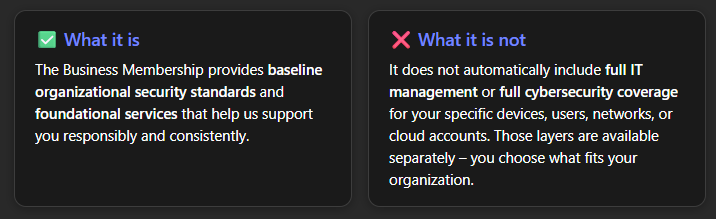
- Cloud Platforms level (Microsoft 365 / Google Workspace): Most businesses use cloud services like Microsoft 365 or Google Workspace. Our membership gives you a baseline of security (like backing up your cloud data and monitoring for breaches). However, ongoing management and advanced security of your cloud tenant (like 24/7 threat detection within M365/Google, or administering user accounts beyond basic adds/removals) is offered through our Cloud Tenant Security service. Without that, we won’t be actively tweaking your cloud security settings or watching for intrusions in real-time (aside from the broad issues covered by the dark web monitoring). In short, membership covers the “outside” (backups, identity monitoring), but not the inside live monitoring of your cloud accounts unless you add that service.
- Network & Location Level (Firewalls/Routers/Wi-Fi): The membership ensures we document your network and include high-level risks in assessments, but managing network hardware or providing on-site support for your location requires additional service. For instance, if you want us to monitor or manage your firewall or handle site-specific network issues, that would be an add-on (in our full Plan 1, network coverage is included, but in the Modular Plan 2, network management is not included by default). So, unless you have a plan that covers network/location, the membership alone doesn’t have a technician watching your firewall or updating your network devices. We will, however, still monitor your domain and external presence (as noted in the benefits above).
- Server Level: Similarly, if your business has on-premises or cloud servers, those are not automatically covered under the membership. Our Managed Server Security add-on covers things like server patching, antivirus, and monitoring. If a server isn’t under a server security plan, we will not be proactively managing or securing it as part of membership. (We’d still document it and include it in the risk assessment, but ongoing maintenance would be separate.)
- Workstation Level: The membership itself doesn’t install antivirus or monitoring software on each of your PCs – that’s provided through our Device Security service (an add-on per device). If you want your computers fully managed and protected 24/7 (which we highly recommend), you would add this coverage. Without a Device Security plan, we aren’t actively managing or monitoring the health of your individual computers. The membership does include the 30-min support line and training for users, but not the behind-the-scenes device protection – unless you add it.
User level (user account management, permissions, multi-factor auth enforcement)
Email Level (Security Filtering): Membership ensures your domain is authenticated and monitored (so others can’t impersonate you easily, and you know if your domain is flagged), but it does not include premium email filtering services. Our advanced spam/malware email filtering is part of the Identity Threat Security service. If you don’t add that, your email will rely on Microsoft or Google’s standard filters (which are pretty good, but the add-on can provide an extra layer). We strongly recommend clients with heavy email use consider this, as phishing emails are a top threat. Without it, membership still gives you training to spot bad emails, but doesn’t pre-filter them beyond what your email provider does by default.
- Cloud Backup for Emails & Cloud Drive – Even cloud data isn’t immune to loss. As part of our overall security suite, we ensure your cloud emails and files (for example, your Office 365 or Google Workspace email and cloud drive such as OneDrive) are backed up to a secure, separate location. This means if you ever accidentally delete an important email or file – or if a rogue malware attempts to wipe out your cloud data – we can restore it. This cloud-to-cloud backup is an essential safety net. (Note: This covers cloud services – see below about backups for servers or PCs.)
- Identity Threat Level: The membership includes basic training and dark web monitoring for identities, but advanced identity security (like detecting if a hacker tries to log in as one of your users, or helping with individual account issues) comes from our Identity Threat Security add-on. This service also layers in things like enhanced spam filtering and helping with day-to-day user account administration (password resets, MFA enforcement). If you opt not to include Identity Threat Security, just know that membership won’t cover those specific tasks or tools by itself. Your team would rely on the built-in protections of Microsoft/Google and our training, but not the extra monitoring software we can provide.
On-Premises Backups (Servers/PCs): As noted, we include cloud-to-cloud backups for your Microsoft 365/Google data (email, cloud drive). However, backups for local servers or individual workstations are not included in the base membership. If you have files stored on a server or PC that need regular backups, those require a separate Backup service (we offer solutions like local device backup or cloud business continuity services). If you’re unsure about your current backup setup, don’t worry – our risk assessment will cover that and we’ll advise if you need to add anything. We just want to be clear that membership itself isn’t backing up, say, the documents on the CEO’s laptop or the data on a local server – that would be a distinct service.
In essence, the Business Membership ensures that the basics are always covered for every client (policy, documentation, baseline security and monitoring). Then, depending on your specific environment, you can choose additional layers to cover all the areas relevant to you. We will work with you (through the risk assessments and our conversations) to identify which layers you need. If a certain layer of security or support isn’t added to your membership, we won’t be actively managing that layer. For example, if you don’t have Device Security, we won’t be watching your individual PCs for malware – though we’d still alert you if our assessments find something amiss and suggest adding the service. This modular approach keeps the membership cost affordable and lets you build a custom security stack that fits your needs and budget.
What’s Next? (Onboarding & Ongoing Support)
Onboarding (Jan – Mar 2026): Our team will reach out starting in January to begin onboarding you into the new system. We have a schedule to get everyone set up by March 31, 2026. During onboarding, we’ll be:
- Installing or updating security tools on your systems (as applicable).
- Setting up the documentation portal for your organization.
- Configuring monitoring (e.g., dark web, domain checks).
- Scheduling training sessions or sending out info for the security awareness program.
- Ensuring cloud backups are running for your email/cloud data.
- Basically, doing all the behind-the-scenes work to implement the benefits listed above.
We will reach out to coordinate any installs or changes that might require a brief interruption of work (we expect minimal disruption). Much of this can be done remotely and silently. If we need to schedule on-site work or a specific time, we’ll do so at your convenience. Remember, we are not charging any onboarding fees – it’s included as part of getting everyone to a higher security baseline.
Quarterly Security/Backup Reviews (Ongoing): As part of maintaining these standards, all business members will have a quarterly security and backup review meeting. This is essentially a check-up every 3 months to review:
- Security reports (from our monitoring tools).
- Backup status (making sure backups – cloud or otherwise – are successful).
- Any new threats or vulnerabilities that have come up.
- Updates on recommended security measures or policies.
- Your questions or concerns about IT/cybersecurity.
We’ll schedule these with you once per quarter. Each review is billed at a 1-hour minimum (as noted in the membership terms), but it’s a crucial part of staying proactive. Think of it like regular maintenance on a car – a little time and investment on a scheduled basis can prevent major breakdowns later. We’ll give you a summary of each review, so you have a record of your security health over time. These reviews are also a great time for you to bring up any IT initiatives or changes in your business, so we can plan accordingly.
No Immediate Action Required from You: You don’t need to do anything special right now. We’ve got your account set to transition on 1/1/2026 automatically. Just:
- Expect an introductory email in early January confirming your membership has started at the $97 rate.
- Look out for communications from our team about scheduling any necessary onboarding steps.
- Mark your calendar for a Q1 2026 security review (we’ll send an invite).
- Discuss internally which term (month-to-month, 1-year, 3-year) you might prefer long-term – but remember, you have until mid-2026 at least before any price change, so there’s no rush.
Of course, if you already know you want to switch to a longer term to lock in savings, you can let us know at any time.
We’re Here to Help: If you have questions or just want to talk through these changes and options, please reach out. The whole point of this notice is to keep you informed and comfortable with what’s happening. You can always schedule a call with us at a convenient time via https://easyitguys.com/book. We’d be happy to go over how the membership and add-ons apply to your specific situation.
Thank you for reading through this important update. We truly believe these changes will strengthen your defenses and make our partnership even more valuable to your business. Cyber threats may be on the rise, but together we will make sure your business stays secure, resilient, and successful.
Now, let’s cover a few frequently asked questions to address anything we might have missed above:
=== Frequently Asked Questions (FAQ) ===
Q: I’m not very tech-savvy. Is there a simple way to explain what this Business Membership is and why I need it?
A: Absolutely. Think of the Business Membership as upgrading from a basic lock to a full security system for your business technology. In the past, you might have gotten by with just an antivirus here and a backup there. But with cyber threats rising, that’s like having just a flimsy lock on your door. The membership is our way of making sure you have a solid baseline: your data is backed up, your emails are protected, we’re watching for bad guys, and your team is being trained – all the essential stuff handled in one plan. It’s required now because we found that if some clients skipped certain basics, it left them (and by extension, all of us) more vulnerable. By having every client on the membership, we know everyone we support has the critical protections in place. This keeps your business safer and allows us to provide better, more consistent service to you. It’s a bit of an adjustment, but it’s really about prevention and peace of mind. And we’re doing our best to make it affordable, especially by giving existing clients our best pricing upfront.
Q: Does this membership mean you’ll be taking over all our IT support and security? Or do I still choose what services I want?
A: The membership gives you the foundation and some universal services (documentation, assessments, monitoring, training, etc.), but you still choose what additional services you need on top of that. We’re not forcing a one-size-fits-all full IT department on you (unless you want that – we do offer a comprehensive Plan 1 that covers everything). If you just want the basics, you can stick with the membership alone. If you need more, you can add device management, cloud security, etc., à la carte. It’s modular. For example, if you have no servers, you won’t add a server plan. If you have 50 PCs, you’ll likely want device security for each of them. We will help you figure out what’s needed (that’s part of the risk assessment and our initial onboarding chat). But rest assured, you’re not paying for things you don’t have. The goal is to cover the must-haves for everyone (via membership), and then tailor the rest.
Q: What if I only want one or two of the services, like just backups or just device security, and not the whole membership?
A: Going forward, the membership is a prerequisite. We aren’t offering, for example, standalone backup or standalone device security without the membership. Why? Because the membership ensures the environment around those services is safe and maintained. It wouldn’t make sense to protect your servers with backups but have no oversight on your security policies or no documentation of what’s been done – that gap could still lead to a breach or major issue. The membership ties everything together. So, if you want just backups, you’d get the membership (for baseline protection and oversight) and then have the backup service as an add-on. The good news is, many clients find that once they have the membership, a lot of their needs are already met by it, and adding one or two things gives them a full, robust IT plan – still often at a lower cost than piecemeal solutions + emergencies in the long run.
Q: Is $97 my final price, or do I have to pay more for other layers?
A: The $97/month (or $297 or $497, depending on term) covers the membership itself – all the items we listed in the membership benefits. Whether you need to pay more depends on your business’s specific setup and needs:
- If you have devices (computers, etc.) that you want fully managed and secure, there would be a per-device fee (for Device Security).
- If you use Microsoft 365 or Google and want us to actively secure and manage that environment, there’s that Cloud Security add-on.
- If you have a server, there’s a server plan, etc.
In many cases, our existing clients already have some of these services (like device security or backup) on their bill, and those would continue, just under the new structure. We’ll provide a breakdown of your current services and how they map to the new plan during onboarding. The key point is, the membership is the base fee everyone pays. On top of that, you might have additional services (and costs) depending on what you need. If you’re unsure what you’re paying for now or what you might need in the future, we can review that together. We aim to be very transparent about pricing – no hidden fees. Everything will be clearly laid out as line items.
Q: If the membership is required, why not just roll those costs into your other services? Why show it as a separate fee?
A: Transparency and flexibility. By showing the membership as its own item, you know exactly what you’re paying for those baseline services and what you’re paying for optional add-ons. It also makes it easier for you to scale services up or down. For instance, if you temporarily decommission a server, you can remove the server security service and its cost, while the membership stays in place. If we lumped it all together, it could be murkier to see what’s what. Also, by having a standalone membership, we can offer that introductory pricing for existing clients and keep it flat even if you add other things. It’s a modular approach: core foundation (membership) + building blocks (add-ons) = your total plan. This way, as your business grows or changes, your IT plan can adapt piece by piece.
Q: Are backups included in this membership? What exactly is backed up?
A: Cloud backups for your email and cloud storage (OneDrive, SharePoint, Google Drive, etc.) are included as part of our security suite (it’s actually delivered via one of the recommended add-ons, but we’re including it for all members by policy). This covers data in platforms like Microsoft 365 or Google Workspace. However, backups for files on your physical PCs or on-prem servers are NOT included in the base membership. Those would require a separate backup service if you need them. Many of our clients have moved a lot of data to the cloud (where we now back it up), but if you still have, say, a file server in your office or you want an image backup of every PC, we need to set up a specific solution for that. We can absolutely help with it (we offer “Local device backup” and “Cloud BCDR (Backup/Disaster Recovery)” services), but it’s not automatically part of the $97 membership.
Q: What’s this about a quarterly security review ticket? Why is that billable if I’m already paying for membership?
A: The quarterly review is a built-in part of the service to keep your security on track. We bill it at 1 hour because it involves a skilled technician/consultant reviewing reports, checking configurations, and often meeting with you to discuss recommendations. Rather than baking that cost into the monthly fee (which would have raised the membership price every month), we keep the membership fee lower and just bill the review when it happens, once per quarter. This way, you only pay for the actual time spent, and it’s at your discounted labor rate. We think it’s fairer and more transparent. It typically will be a regular cadence: four times a year, you’ll see a line item for 1 hour of service for the quarterly review. If the review uncovers something that needs extra work, we’d scope that separately (and always with your approval). But if everything looks good, that one hour is all it is. Many clients actually appreciate the dedicated time to think about IT strategy and ask questions outside of break-fix issues.
Q: Can I cancel the membership or change my term later? What if I sell my business or something changes?
A: We understand things change. If you’re on month-to-month, you can cancel any time (though remember, after 2026 the price would be higher on that). If you’re on a 1-year or 3-year term, we consider that a commitment – it helps us plan and give you discounted rates. That said, if an extraordinary situation occurs (like you sell the business or it shuts down), we handle those on a case-by-case basis; we’re not out to punish anyone, we just need to cover our costs. In terms of changing term: you can upgrade your term at any point (e.g., go from monthly to 1-year, or 1-year to 3-year) to secure a lower rate. That new term would then reset from that date forward. Downgrading (e.g., leaving a 3-year early to go to monthly) isn’t standard, but again, talk to us if there’s a special circumstance – we want to find a solution that works. Our primary aim with terms is to balance commitment with flexibility: we offer big discounts for commitment, but we also gave a generous grace period for you to try it out and decide.
Q: This is a lot to digest. How can I be sure what’s right for my business?A: It
is a lot, we know! Take your time with the information. That’s one reason we provided this in writing. The next step is our team will reach out to go over your specific account. We’ll likely schedule a short call in January to personally walk you through what you have with us now, how it translates to the new membership model, and answer your questions one-on-one. We’ll also schedule that first quarterly review in Q1, which will double as a deeper dive into any recommendations for additional layers you might need. And remember, you can always reach out to us proactively –
schedule a call using our link, or just give us a ring at our support line. We’re here to help make IT easy (it’s in our name

). Our goal isn’t just to secure your business, but to ensure
you feel comfortable and informed about the decisions. We’ll work together to tailor the right level of coverage for you.
We hope this updated notice clearly explains the upcoming mandatory security updates and the introduction of the Business Membership as the foundation of our services. The world of cyber threats can be complex, but we’re committed to guiding you through it with clarity and care. By taking these steps now, we’re confident that your business will be far better protected in 2026 and beyond.
Thank you for your trust and partnership. We value every one of our clients, and our responsibility is to keep your technology running smoothly and safely. Together, let’s make 2026 a year of strong security and worry-free IT for your business! If you have any questions or concerns, please don’t hesitate to schedule a call with us at https://easyitguys.com/book or contact our support team directly. We’re always here to help.
Sincerely,
Charles Van Duynhoven
IT & CyberSecurity Director, EasyITGuys
(on behalf of the EasyITGuys Team)


 Mandatory Security Update Starts January 1, 2026

 This is our way of saying thank you for your loyalty. You’ll have up to 12 months (until end of 2026 Q2) to decide whether to stick with month-to-month or lock in a 1-year or 3-year term for the future. During this grace period, you enjoy the lowest rate without a long-term commitment.
 Business Membership = Foundation (Add-On Security Layers Available)