ThreatLocker is an advanced security layer that helps control what software is allowed to run and what software is allowed to run with administrator rights. The goal is simple: protect the business from cyberattacks, unsafe software, risky admin activity, and unplanned system changes that can cause downtime or support issues.
|
ThreatLocker helps make the environment safer, more predictable, and easier to support. It does not exist to make work harder. It exists to let safe work happen in a controlled and documented way.
|
Why businesses use ThreatLocker #
- It helps stop unknown or unsafe programs before they run.
- It reduces the chance of ransomware, malware, fake updates, and risky remote access tools.
- It gives the business better control over software changes and administrator rights.
- It creates a cleaner, more supportable IT environment with stronger auditability.
The two controls users see most often #
- Application control keeps a list of software that is safe to run. If a program, installer, or update has never been seen before, it may be blocked until reviewed and approved.
- Elevation control manages what can run with administrator rights. This allows the business to keep users as standard users while still allowing approved work to be completed safely
How do you know if threatlocker is installed? #
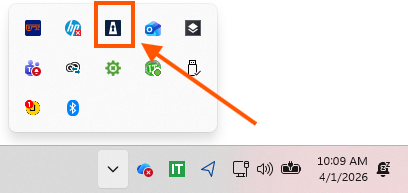
The icon will appear in your toolbar, popups will occur, and you may see an error when opening up a program that is new.
 |
|
1. The ThreatLocker icon in the Windows system tray gives quick access
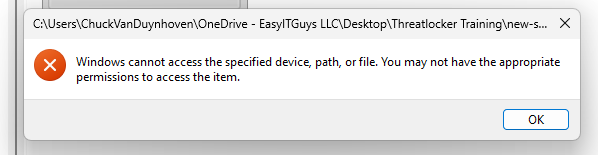 |
| 2. A blocked launch often appears first as a Windows access message before the ThreatLocker request prompt appears.
|
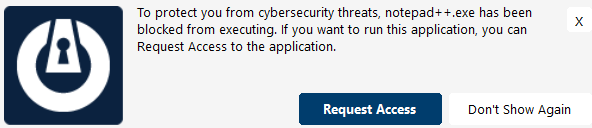 |
3. The first popup usually offers a Request Access option when new software is blocked. |
|
What happens during initial setup #
When ThreatLocker is first installed, there is usually an initial 14-30 day learning period. During that time, the system observes what is normal so a safe baseline can be created. This helps reduce disruption while improving control.
What end users and technical staff should remember #
- Blocked does not automatically mean broken or dangerous. It often means the item needs review.
- The request workflow is designed to be fast, documented, and easier than guessing what to do next.
- Users should follow the popup and add a short work-related reason for the request.
- The Support Desk is still the best path when the issue is urgent or business critical.
Choose the guide that fits your role #
 |
 |
| End User Guide |
Technical Guide |
Discover more from EasyITGuys #
Subscribe to get the latest posts sent to your email.



