
Policy Summary #
- Servers must be located in a server room, not in open offices, storage rooms, or shared utility spaces.
- Server rooms must be locked, with controlled access.
- Access must be logged, either paper or digital.
- Environmental control is required, including temperature and humidity management.
- Power protection is required, using a correctly sized UPS with remote management.
- Servers must be real servers, with redundant hardware designed for business operations.
- Server warranty standard: Production servers should use on-site 4-hour (same day) response warranties for best uptime. Depot-only warranties are for non-critical systems or budget-limited scenarios.
- Support boundary: Servers without an active warranty or vendor support may be limited to 15 minutes of best-effort assistance. IT and cybersecurity teams are not replacements for manufacturer warranty services or vendor support.
Related standard: For detailed temperature and humidity targets, humidification options, monitoring placement, and contingency guidance, see Server Room Environmental Control Standards. For air quality and cleaning standards, Server Room Air Quality and Cleaning Standards.
Visual Quick Guide #
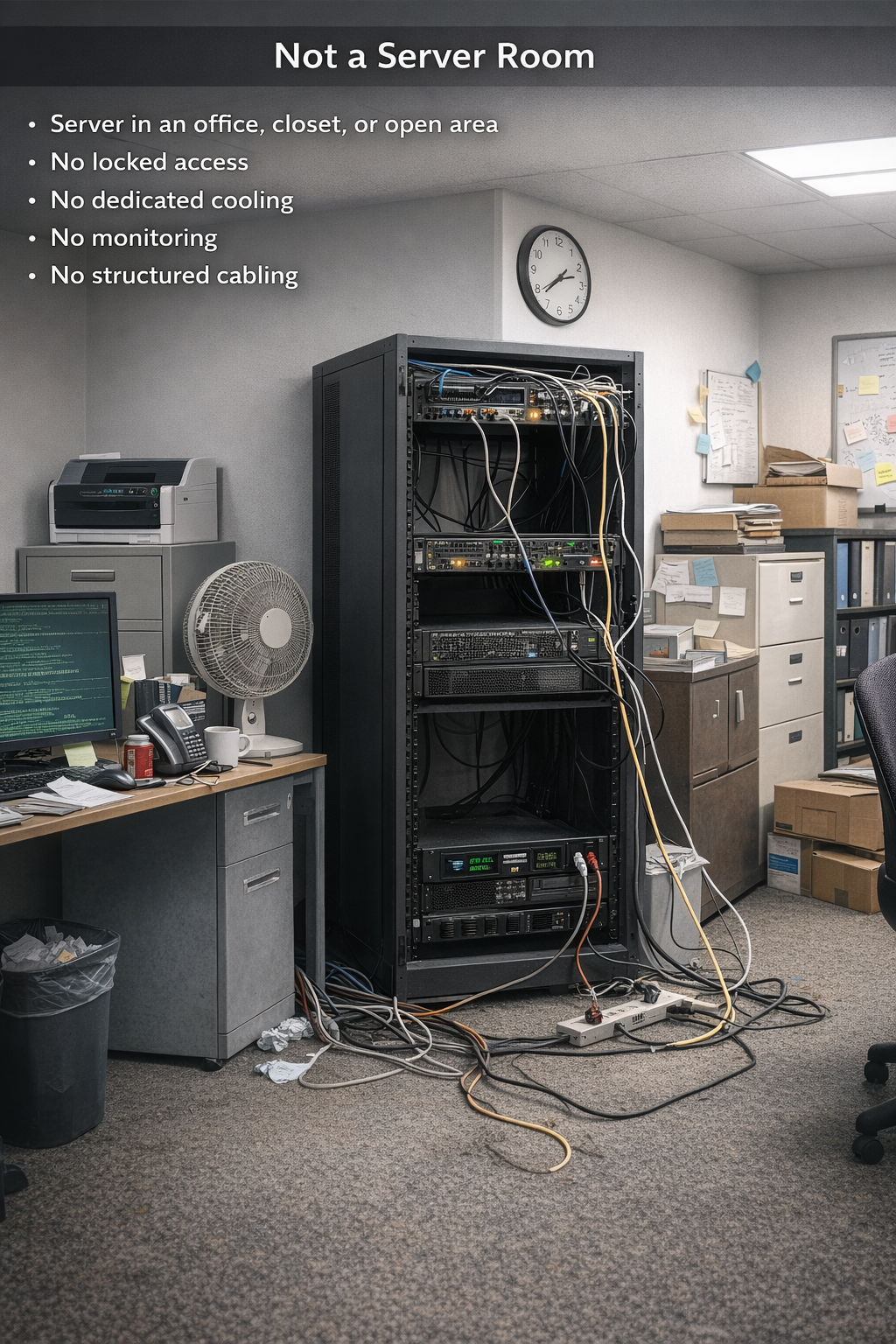
A server room is a managed space with environmental control, physical security, and predictable layout. These diagrams show the difference at a glance.
Not a Server Room: Server in an office, closet, or open area. No locked access, No dedicated cooling, No monitoring, No structured cabling
Is a Server Room: Dedicated locked room controlled access. Has dedicated cooling with temperature and humidity monitoring/alerts. Has structured cabling and labeling. Has a rack or cabinet layout with firewall, switching, servers, and storage. Has a network connected UPS and PDU for clean power and runtime.

Server Room Requirements #
Goal: Maintain a stable environment that protects equipment, reduces risk, and extends hardware life.
1) Environmental Control #
Temperature #
- Temperature must be controlled and continuously monitored.
- Provide dedicated cooling for the server room, sized to the heat load (IT equipment plus UPS and power losses).
- Configure alarms if temperature moves out of range or if cooling fails.
- Target operating range (recommended): 68°F to 70°F.
- Acceptable inlet air range (ASHRAE guidance): 64°F to 81°F
- Expected Exhaust Temperature (Rear of Server/Rack): With a stable server air intake of 68°F to 70°F, the warm-air exhaust is typically 10°F to 25°F higher, so you will commonly see 78°F to 95°F at the rear of equipment. Higher exhaust temperatures can occur under heavy load, but the primary requirement is maintaining stable intake temperature and preventing hot-air recirculation.
- Learn More: Server Room Environmental Control Standards
Humidity #
- Relative humidity (RH) must be controlled and continuously monitored at the equipment air intake.
- Configure alarms if humidity moves out of range or if humidification/dehumidification fails.
- Target operating range (recommended): 40% to 60% RH.
- Acceptable range (ASHRAE guidance): 20% to 80% RH (avoid extremes and large swings)
- Expected Exhaust Humidity (Rear of Server/Rack): With stable intake humidity (target 40% to 60% RH), exhaust RH is typically lower because the air is warmer. A common expectation is 5% to 20% lower RH at the rear under steady conditions. This is normal. The primary requirement is maintaining stable intake RH and avoiding large fluctuations.
- Learn More: Server Room Environmental Control Standards
Why it matters
- Below 40% RH: Increased risk of electrostatic discharge (ESD).
- Above 60% RH: Higher risk of condensation, corrosion, and hardware failure, especially during temperature changes.
Air Quality and Contamination Control
- Intake air must be kept clean and appropriate for IT equipment.
- The room must be kept free of excessive dust, lint, smoke, oil mist, cardboard debris, and other airborne contaminants.
- Prevention is the standard. Do not wait until equipment is visibly dirty or airflow is restricted.
- Environments with high particulate matter, corrosive air, washdown exposure, moisture, VOCs, or heavy dust require added protections such as improved filtration, sealed or filtered cabinets, or a more isolated room design.
- Learn More: Server Room Air Quality and Cleaning Standards
Controls and Management #
- Monitoring: Use sensors placed at server intake height, not only on a wall near the door.
- Dehumidification: Required if RH trends high (commonly >60%).
- Humidification: Required if RH trends low (commonly <40%).
- Alarms: Required for out-of-range temperature or humidity, and for cooling or control system failure.
Implementation guide: See Server Room Environmental Control Standards for targets, monitoring placement, humidification options, and temporary risk-managed approaches.
2) Controlled Access and Security #
- The room must remain locked at all times.
- Only authorized staff may enter.
- All access must be logged, paper or digital.
- Recommended. Door access control (badge or code) to enforce authorization.
- Recommended. Security camera coverage of the room entry and rack area.
3) Space, Layout, and Clean Installation #
- A rack or cabinet is required for servers, networking, UPS, and cable management
- Structured cabling is required
- Maintain clear airflow at the front and rear of equipment. Do not block intake or exhaust paths.
- Keep the room clean. Do not store cardboard, paper stock, janitorial supplies, chemicals, or unrelated inventory in the server room.
- Label everything. Label patch panels, switch ports, power feeds, and equipment names.
- No food or drink near the rack
- The room should remain clean, tidy, and free of excessive dust.
Cleaning and Preventive Maintenance
- Clean the room on a defined schedule
- Inspect dust buildup on rack intakes, filters, blanking panels, UPS vents, and server bezels
- Plan server cleaning as a controlled maintenance task, since internal cleaning often requires downtime unless workloads are failed over or high availability is in place.
- Prevention is preferred over waiting until a server is visibly clogged.
- Learn More: Server Room Air Quality and Cleaning Standards
4) Monitoring and Alerting #
The server room should be monitored so problems are detected early.
- Temperature monitoring
- Humidity monitoring
- Power and UPS status monitoring
- Cooling unit status monitoring
- Air filter / contamination inspection reminders
- Maintenance reminders for server cleaning based on environment
- Alerts routed to the right team for fast response
Environmental monitoring details: Sensor placement, alert thresholds, and response guidance are covered in Server Room Environmental Control Standards.
Power and UPS Standards #
Servers require power protection. A correctly sized UPS prevents abrupt shutdowns during outages and protects equipment from power events.
UPS Requirements #
- UPS must be sized for the power load and the uptime goal.
- UPS must be network connected and manageable remotely.
- UPS should support automated safe shutdown when runtime is low.
- UPS should include environmental sensors for temperature and humidity if the room does not have dedicated sensors.
- UPS should be documented with battery age, replacement schedule, and load level.
Recommended Additions #
- Rack mounted UPS for clean installation
- Managed PDU for controlled power distribution and labeling
- Separate power circuits where available and appropriate
Server Standards #
Servers must be built for business operations. Consumer desktops and improvised hardware do not meet this standard. Servers should be sized for planned growth over a 3 to 5 year lifecycle. True servers include redundant power, redundant enhanced data storage (RAID), remote management, and 4-hour on-site warranty when critical.
Minimum Server Requirements #
- Redundant power supplies
- Redundant high performance memory (ECC)
- RAID capable storage design that matches performance and redundancy needs
- Hot swap drives where appropriate
- Redundant cooling and proper airflow design
- Remote management for out of band access (example: iDRAC, iLO, or equivalent)
- Vendor support and warranty coverage aligned to the lifecycle plan
Sizing and Lifecycle Planning #
- Plan for growth in users, storage, and workload over 3 to 5 years.
- Avoid minimum sizing. Minimum builds often fail early as needs increase.
- Standardize where possible to simplify support and replacement planning.
- Document the plan. Record intended service life, refresh year, and expansion capacity.
Server Warranty Standards #
Server warranties directly affect uptime. When a server is down, the business is often down.
For the best uptime, production servers should be protected with an on-site same day 4-hour response warranty.
Recommended Standard for Best Uptime #
- On-site same day 4-hour response for production servers and critical infrastructure.
- This reduces downtime by ensuring parts and labor arrive quickly.
- It also standardizes expectations for business operations and support response.
When Depot or Off-site Warranties Are Acceptable #
Depot and off-site warranties can be acceptable for non-critical systems, lab systems, or in situations where the budget does not allow for on-site same day coverage.
Depot warranties typically require you to box and ship the server, then wait for repair and return shipping. A common turnaround is 7 to 14 business days at a minimum, and it can be longer depending on queues and shipping.
Business Impact of Depot Warranties #
If the server is a critical device, depot repair timelines can mean the system is offline and the business is impacted unless one of the following is in place:
- A replication or failover server that can take over workloads.
- A BCDR (business continuity and disaster recovery) device and service that can restore operations quickly.
Warranty Options at a Glance #
| Warranty Type | Best For | What to Expect | Operational Risk |
|---|---|---|---|
| On-site 4-hour (same day) | Production and critical servers | Fast parts and labor response on-site | Lowest |
| Next business day on-site | Important systems with moderate downtime tolerance | Repair begins next business day after diagnosis | Moderate |
| Depot / ship-in | Non-critical systems or budget-limited situations | Ship out and wait, often 7 to 14 business days or longer | Highest unless failover or BCDR exists |
Simple rule. If the server outage stops business operations, treat it as critical and use on-site same day coverage or ensure failover or BCDR is in place.
Support Boundaries for Servers Without Warranty or Vendor Support #
Reliable server support requires an active manufacturer warranty or vendor support agreement. Servers are specialized systems, and certain failures
require vendor diagnostics, replacement parts, and manufacturer-level service.
Best-Effort Policy #
If a server does not have an active warranty or vendor support, assistance is limited to 15 minutes of best-effort troubleshooting.
This policy exists because IT and cybersecurity teams are not replacements for manufacturer warranty services or vendor support. When parts or specialized vendor tooling are required, progress cannot be guaranteed without a supported pathway.
What the 15 Minutes Typically Covers #
- Quick triage to identify obvious issues and confirm symptoms
- Basic checks for power, connectivity, and alert indicators
- Review of monitoring alerts, logs, and recent changes (if available)
- Guidance on next steps, including support options and risk mitigation
What Usually Requires Warranty or Vendor Support #
- Hardware failures requiring replacement parts (drives, power supplies, RAID controllers, mainboards)
- Advanced diagnostics using vendor tools and proprietary firmware utilities
- On-site repair services and expedited part replacement
- Firmware compatibility issues or storage backplane and controller failures
Operational Recommendation #
Production servers should be kept under active warranty or vendor support for the full planned lifecycle. If budget constraints require a server to run without coverage, the organization should accept the increased risk and consider a redundancy plan such as replication, failover, or a BCDR solution.
Design Levels #
Not every organization needs the same level of resilience. These levels keep expectations clear.
| Level | Best For | Includes |
|---|---|---|
| Baseline | Most small and mid-size environments | Locked room, dedicated cooling, monitored UPS, rack install, access log |
| Recommended | Organizations that rely heavily on servers or have compliance needs | Baseline plus door access control, camera monitoring, enhanced alerts, cleaner redundancy planning |
| Resilient | Operations that cannot tolerate downtime | Recommended plus stronger power strategy, improved failover design, and higher availability planning |
One Glance Checklist #
| Standard | Required | Recommended |
|---|---|---|
| Dedicated server room. Locked at all times | Yes | |
| Access log for all entry | Yes | |
| Door access control system | Yes | |
| Security camera coverage | Yes | |
| Dedicated cooling with alarms | Yes | |
| Temperature and humidity monitoring | Yes | |
| Rack or cabinet with cable management | Yes | |
| UPS sized for load and runtime, with network management | Yes | |
| Environmental sensor on UPS if room sensors not present | As needed | |
| Business grade server with redundant hardware | Yes | |
| Server sizing and refresh plan for 3 to 5 years | Yes |
Server Purchasing and Sizing Guide #
For detailed guidance on selecting and sizing the right server, use this guide: A Complete Guide to Buying a New Server for Your Business


