
ThreatLocker is an advanced security layer that helps control what software is allowed to run and what software is allowed to run with administrator rights. The goal is simple: protect the business from cyberattacks, unsafe software, risky admin activity, and unplanned system changes that can cause downtime or support issues.
|
ThreatLocker helps make the environment safer, more predictable, and easier to support. It does not exist to make work harder. It exists to let safe work happen in a controlled and documented way. |
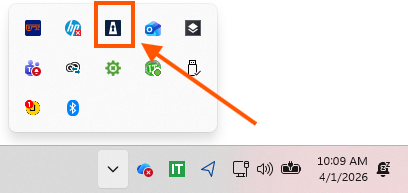
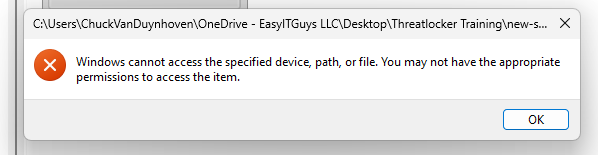
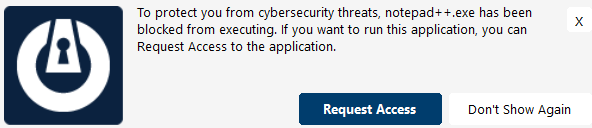
The icon will appear in your toolbar, popups will occur, and you may see an error when opening up a program that is new.
1. The ThreatLocker icon in the Windows system tray gives quick access
2. A blocked launch often appears first as a Windows access message before the ThreatLocker request prompt appears.
3. The first popup usually offers a Request Access option when new software is blocked.
When ThreatLocker is first installed, it enters a 14 to 30 day learning period. During this time, it learns which programs are normally used. It then adds those programs to a safe and approved list. This helps keep the rollout smooth. It also helps important software continue working after the learning period ends and Secure Mode is turned on. ThreatLocker already recognizes more than 10,000 common applications. This helps make setup faster and easier.
After the learning period, only trusted and approved software is allowed to run. This gives the company stronger protection, better control, and a smoother overall technology experience.


 |
 |
| End User Guide | Technical Guide |


